


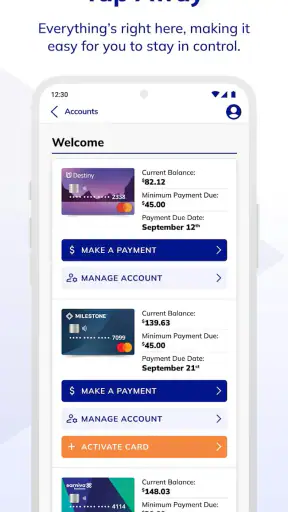
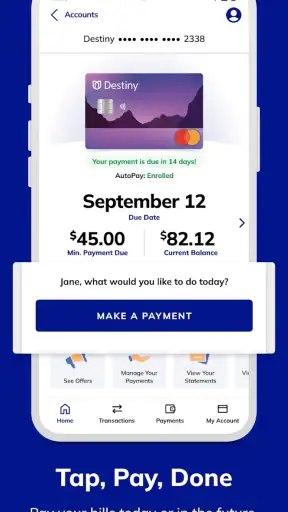
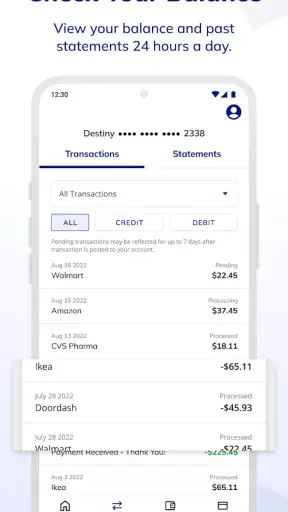
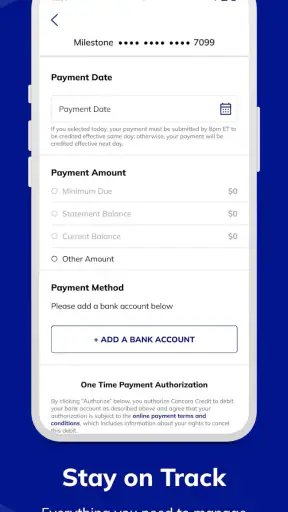
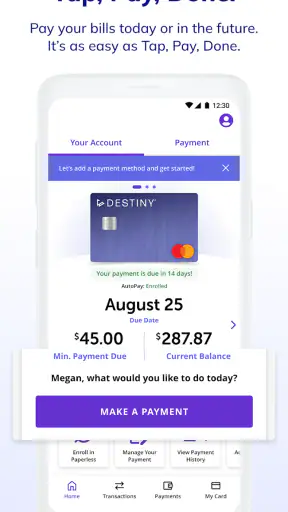
Managing a credit account from a phone sounds simple, but the experience depends heavily on how quickly the app can connect, load the right account details, and confirm that an action has actually gone through. I spent time looking at Concora Credit from that practical angle rather than treating it as a general budgeting tool. It is a free finance app from Concora Credit, designed to help customers manage their account or accounts in one mobile place. That focus is important: this is not trying to replace a full banking app, investment dashboard, or detailed expense tracker.
My overall impression is that it is most useful when I need a direct route to my Concora Credit account while away from a computer. The convenience is clear, especially for checking an account before making a payment or reviewing activity after a purchase. At the same time, the app’s value is closely tied to having a reliable connection and to already being a Concora Credit customer. If I wanted broad control over several unrelated financial products, I would look elsewhere.
How connectivity shapes everyday account management
When a live connection matters most
The moments that matter in a credit account app are usually short and practical. I might be standing in a store, checking whether a recent payment is reflected, or trying to review an account before deciding whether a purchase fits my available credit. In those situations, the app needs to retrieve current account information rather than simply display a static balance saved from an earlier visit.
That makes the network part of the experience, not just a background technical detail. A strong connection can make the app feel direct: open it, sign in if needed, review the account, and move on. A weak connection changes the mood quickly. Loading takes longer, a screen may need another attempt, and I become less confident about whether the information shown is current.
I would be especially careful when checking a payment or account change close to an important deadline. A slow screen does not necessarily mean an action failed, and repeatedly trying the same action can create confusion. My preferred habit is to wait for a clear confirmation, then reopen or refresh the relevant account view before assuming everything is complete. That small pause is more useful than tapping repeatedly when the network is unstable.
For people who manage more than one eligible account, the connection also affects how smoothly they can move between them. The app is intended to manage account or accounts, so the benefit is not only having a mobile shortcut but also having a single place to review the Concora Credit relationship. The practical trade-off is that each account view still depends on current information being retrieved correctly.
A realistic mobile scenario
Imagine I am away from home and want to make a purchase using a Concora Credit account. Before paying, I open the app to check the account status and recent activity. If the connection is good, this is exactly the sort of small task a dedicated account app handles well. I do not need to open a desktop browser or search through unrelated banking features. I can focus on the account I actually use.
Now imagine the same situation in a crowded shop, a car park, or a building with unreliable reception. The app may take longer to respond, and I may not want to make a financial decision based on an old screen. In that case, I would treat the app as a convenient check rather than an absolute guarantee that every recent change is visible immediately. If the decision is urgent, I would wait for a stable connection and confirm the result instead of relying on a partial load.
This is one of the app’s strongest and weakest qualities at once. Its narrow purpose keeps the experience more focused than a large financial super-app, but it also means the app has to do its core account work reliably. There are fewer unrelated tools to distract me, yet connectivity problems become more noticeable because account access is the main reason to open it.
Using it in different mobile contexts
Concora Credit makes the most sense for quick checks on a personal phone. I would use it before a purchase, after reviewing a statement, or when I want to keep an eye on account activity without sitting at a computer. The phone format is helpful because these are often brief tasks, not long financial planning sessions.
I would not approach it as a replacement for a complete household finance system. Someone who wants category-based spending analysis, investment monitoring, bill management across many providers, or a combined view of several banks will probably find a conventional banking app or finance aggregator more suitable. Concora Credit’s advantage is directness, not breadth.
There is also a useful distinction between checking information and taking action. A quick balance review is relatively easy to fit into a busy day. A payment or account change deserves more attention, particularly when the connection is poor or the app has been left open for a while. I prefer to begin those tasks from a stable location, avoid switching between many apps, and confirm the final state before closing the session.
That workflow may sound cautious, but it is realistic for any app handling credit information. A phone can be convenient while also being easy to interrupt. Calls, notifications, movement between Wi-Fi and mobile data, and an expiring session can all make a short financial task less straightforward than expected. The app is most comfortable when I treat it as a focused account tool rather than something to leave open all day.
What happens when something goes wrong
The most frustrating failure is not necessarily an error message. Sometimes the harder problem is uncertainty: the screen is still loading, the connection drops after an action, or I am unsure whether the latest account information has arrived. With a finance app, that uncertainty deserves more attention than it would in a social or entertainment app.
My recovery approach is deliberately simple. First, I stop tapping so I do not accidentally repeat an action. Then I check whether the phone has a usable connection and give the current screen time to finish. If the result is still unclear, I close and reopen the app, sign in again if required, and look for the account state or activity record that confirms what happened. I would keep any confirmation details available until I was satisfied that the action was recorded.
This is also where the app’s mobile convenience has a limit. A dedicated account app can put the right information close at hand, but it cannot remove every uncertainty caused by a weak network or a delayed account update. I would not blame every delay on the app itself, yet I would still judge the overall experience by how calmly and clearly I can recover from one.
Users should also avoid making a financial decision from a screen that has clearly failed to refresh. If the app shows an old-looking page, a blank section, or a loading state, I would not treat that as a reliable current balance. Waiting for a complete view is a better habit than guessing. This is a small but important distinction between using the app casually and using it responsibly.
Keeping mobile data use sensible
For ordinary account checks, I would not expect a finance app to require the same kind of continuous connection as video or music streaming. Still, every refresh uses some communication, and repeated attempts during a poor signal can be wasteful and frustrating. I would avoid repeatedly pulling down the same screen when the network is clearly struggling.
My practical routine would be to use Wi-Fi when it is trustworthy, switch to mobile data when I need a timely check, and avoid opening the app simply to refresh without a reason. I would also make sure the phone is running a current version available to me, since the installed version is listed as 3.0.17 and newer app releases can sometimes improve compatibility or reliability. I would not assume that an update solves every network issue, but keeping the app current is a sensible first step.
People with limited data plans may prefer to group account checks together instead of opening the app many times throughout the day. For example, I could review recent activity and account status in one deliberate session rather than checking after every small purchase. That approach is easier on data, battery, and attention, while still giving me a useful picture of the account.
Privacy also matters in mobile contexts. I would avoid checking sensitive financial information on an unfamiliar public network when I can wait for a trusted connection. I would be careful with notifications and screen visibility in public places, especially if another person could see account details. These are not special features of Concora Credit, but they change how comfortable the app is to use outside the home.
Who will benefit and who should choose another tool
I think the app is a good fit for an existing Concora Credit customer who wants a straightforward mobile route to account management. It is particularly useful for people who make short, occasional checks and do not want the extra complexity of a broad financial platform. The free price removes a barrier to trying it, and the Everyone age rating makes it approachable for a wide audience, although the usefulness naturally depends on having a relevant account.
The app is less convincing for someone searching for a complete money-management center. If I needed to combine a Concora Credit account with checking accounts, cards from other providers, savings goals, investment balances, or detailed spending categories, I would choose a broader finance solution. That type of tool may offer more overview, while Concora Credit offers a more direct relationship with its own accounts.
I would also skip it as my main financial tool if I rarely use my phone for account administration or if I prefer handling important transactions through a desktop browser. A mobile app is not automatically better simply because it is mobile. Its real advantage appears when I need access during the day and want a focused experience rather than a full financial workspace.
What the adoption numbers suggest, and what they do not
The app has passed one million installs, with an average rating of 3.4 from around three and a half thousand ratings and roughly one thousand seven hundred written reviews. That tells me it has a meaningful user base, but the rating also suggests the experience is not universally smooth. I would read that as a reason to keep expectations practical: useful for its intended account tasks, but not necessarily flawless on every phone or connection.
It was released on June 21, 2023, and the current version is 3.0.17. It supports devices running Android 7.1 or later. Those details matter if I am using an older phone, because compatibility is part of the decision before spending time setting up an account app. I would check the phone’s operating system first rather than assuming every Android device can install it.
The developer is Concora Credit, which reinforces the app’s focused role. I would expect the best reason to install it to be direct management of a Concora Credit account, not general financial discovery. That clarity is helpful: I know what problem it is meant to solve, and I can compare it fairly with alternatives instead of asking it to perform a job it was not designed for.
My practical verdict on connected access
After looking at the app through the lens of connectivity, I see Concora Credit as a useful companion for quick, account-specific tasks. It can save time when I am away from a computer and need to review account information from my phone. Its narrow purpose is a strength for existing customers who value a direct path, while its dependence on live account access means network quality can strongly influence how confident and comfortable the experience feels.
The best way to use it is with a simple routine: open it when there is a clear reason, use a stable connection for important actions, wait for confirmation, and verify the account view if anything behaves unexpectedly. I would not repeatedly retry a payment during a network interruption, and I would not treat a partially loaded screen as current information.
My recommendation is conditional but positive: if you already manage a Concora Credit account and want a free mobile access point, this app is worth considering. If you want a complete financial dashboard or need dependable access in places with unreliable connectivity, a broader alternative or a desktop option may serve you better. For its intended purpose, it is focused and convenient; the main trade-off is that the convenience works best when the phone can maintain a clear connection to the account.
With an average rating of 3.4, the app is not one I would describe as universally polished, but it remains a sensible option for the right user. I would install it for direct account management, keep my expectations centered on that job, and use a careful confirmation habit whenever a financial action is involved.


